NNARINSAYATHE VILLA COLLECTION

ELEVEN PRIVATE POOL VILLAS

A place to explore.

Choose a villa, or begin at the entrance.

THREE BEDROOMS · PRIVATE POOL

Your next destination.

Explore the road, then step inside.

Tour interior →

Aerial-informed estate · representative villa interiors

VR navigation previewEstate arrival

Click the floating menu · Hide panel to walk · WASD / arrows · Drag to look · Q / E turn · M menu

N

Opening the neighbourhood.

Preparing the villas, roads and gardens…
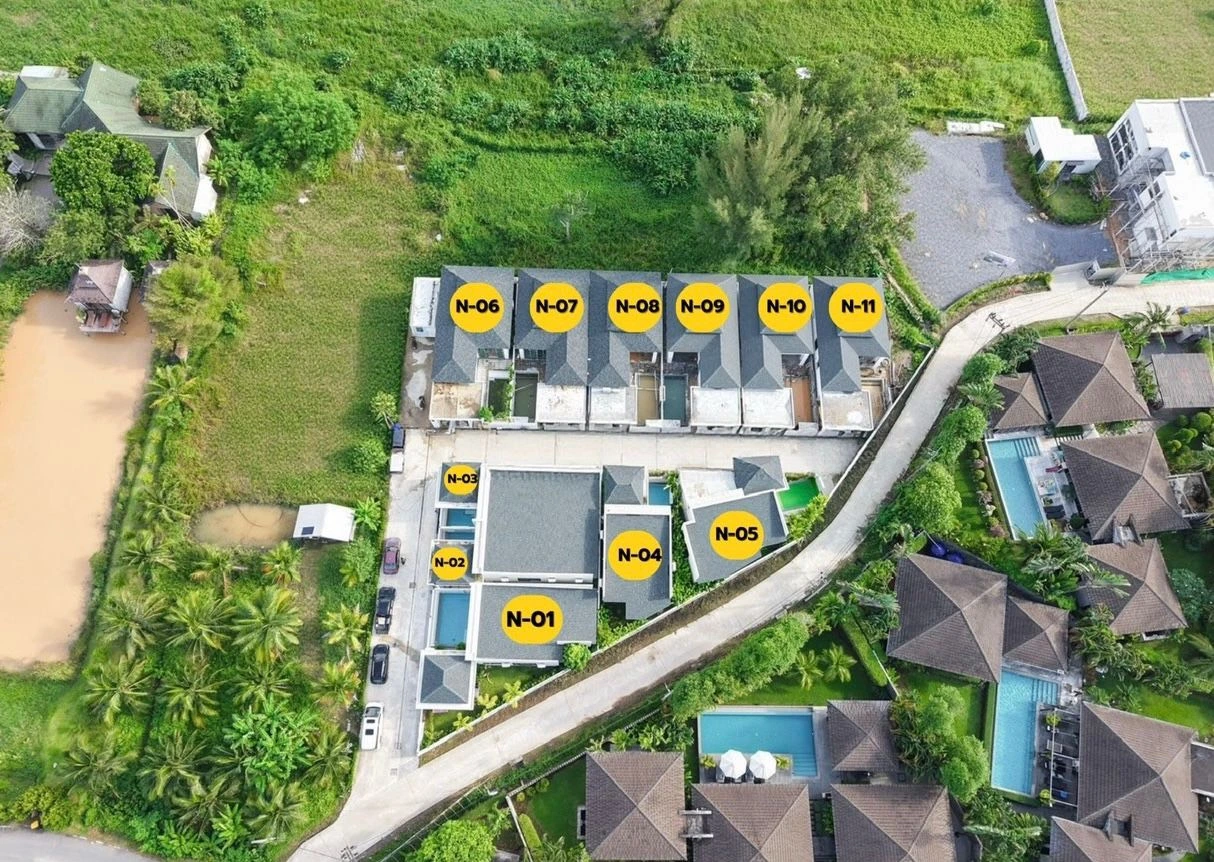
ORIGINAL SUPPLIED AERIAL

One neighbourhood. Eleven villas.

Select a villa to find it in the 3D estate.

Unredrawn source aerial showing plots N-01 to N-11

Villa numbers remain in their source positions. This is a reference photograph, not a measured site survey.

Explore with confidence.

All eleven Narinsaya plots are represented. The supplied schedules identify N-01 to N-05 as two-bedroom villas, and N-06 to N-11 as three-bedroom villas.

The estate arrangement and roads follow the supplied aerial. Distances, gradients, boundaries, landscaping and individual exterior variations are approximate. Plot sizes and pool dimensions vary; this is not a survey or a measurement tool.

The furnished models are reused by villa type. Selecting a plot opens its representative two- or three-bedroom interior, not an independently surveyed interior for that unit. The two-bedroom layout is photo-based.

Use Walk the road for first-person exploration. Drag to look and use W/A/S/D, arrow keys or the on-screen arrows to move. Go to entrance takes you to the selected villa. Tour interior opens its rooms; Back to estate returns you to that entrance.

Architecture and furnishings authored for the villa tours. CC0 materials and vegetation from Poly Haven. No prices or availability are asserted.

STEP INTO NARINSAYA

The whole estate. Around you.

Explore the roads, visit any of the eleven villas and move between furnished rooms without leaving VR.

Left joystickWalk forward, back or sideways
Right joystickTurn in comfortable 30° steps
Point + triggerSelect a villa, room or pool deck
B / Y or gripBring navigation back in front of you

Movement pauses while the navigation panel is open. Select Hide panel to walk. Room and villa shortcuts let you explore beyond your physical play area.

Checking headset support…

Open this same website in Meta Quest Browser, then select Enter VR. Headset controls need a compatible WebXR browser. Interiors are representative by villa type; estate dimensions are approximate.